
Short answer
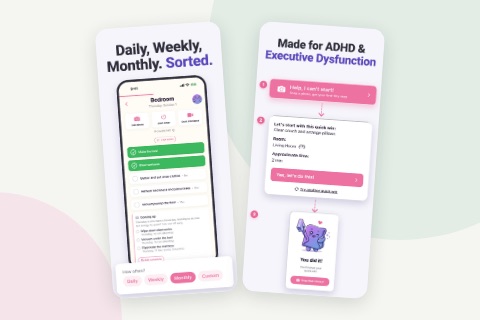
An app that tells you what to clean every day needs three things: a short list of daily tasks, a fixed day for each room, and a rule for how often each bigger task comes back. ADHD Cleaning Planner works this out for you, names today's focus room, and puts the next task on your Home Screen.
On this page
An app that tells you what to clean every day has to answer one question each morning: what room should I clean today? It can only do that if three things are already decided. Which small tasks happen every day, which day of the week belongs to each room, and how often each bigger job comes back. With those three set, the answer for any day is simply the daily tasks plus whatever is due in today's room, and you never have to work it out again.
What room should I clean today?
If you have no system at all, the quickest honest answer is this: the room you use most, for ten minutes, starting with whatever is on the floor. That works for one day. It does not work for a month, because every morning you are back to deciding, and with ADHD the deciding is often the part that stops you before anything else does.
What works for a month is deciding once. Give each room a day of the week: kitchen on Monday, bathroom on Tuesday, bedroom on Wednesday, and leave at least one day with nothing. Cleaning one room at a time is usually better than a bit of everything, because a room has an ending: you can see when it is done, while a little tidying in every room leaves none of them looking finished. Then put a small set of daily tasks on top, the things that make the house worse within a day if nobody does them: dishes, surfaces, one load of laundry moving along. That is the whole idea behind a cleaning routine that survives a bad week, and the free ADHD cleaning schedule builds that week for your own rooms on one printable page.
Why "every day" is the hard part
A weekly plan on paper looks complete, but it leaves out one thing that matters a lot. Not every task belongs every week. Wiping the kitchen counter is daily. Changing the bed is weekly. Cleaning the oven or the windows might be monthly, or every three months. If all of those sit on one list for "kitchen day", the list is too long every single week, and a list that is always too long is a list you stop opening.
So a useful daily answer needs a fourth thing: how often each task comes back. That is the part paper is bad at. You can write "every 3 months" next to a task, but nobody remembers when it was last done. An app can count that for you, and this is where an app genuinely earns its place over a sheet on the fridge.
The other thing paper cannot do is tell you. A schedule taped inside a cupboard tells you nothing until you open the cupboard. What helps is the answer showing up where you already look, at a time you chose, without you having to remember that it exists.
How ADHD Cleaning Planner decides what you clean each day
ADHD Cleaning Planner is an iPhone and Android app, free to download with in-app purchases, and it needs no account. Its main screen, Today's Plan, is the answer to "what should I clean today". We have a screen-by-screen tour of the whole app; this page is only about how that daily answer is put together and how it reaches you. The screenshots are from the iPhone version.
1. Every room gets one focus day
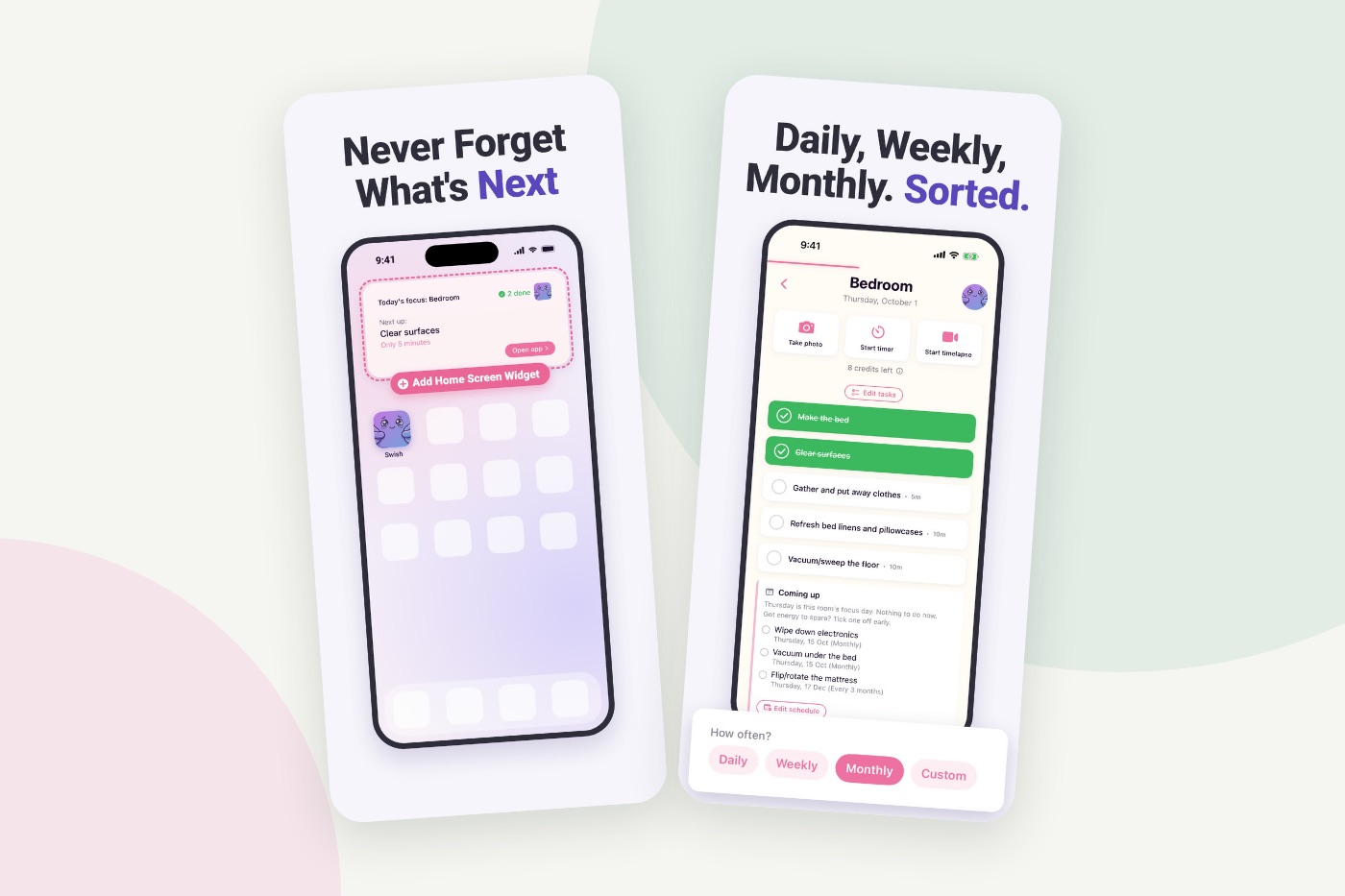
Under Schedule you pick one day of the week per room. The app's own explanation is short: "Daily tasks happen every day. Everything bigger lands on one day per room." On the day itself, Today's Plan says "Today's focus:" and names that room, or two rooms if you gave them the same day. On a day that belongs to no room, it says "Only your daily tasks", which is a perfectly good day.
2. Every task gets its own "How often?"
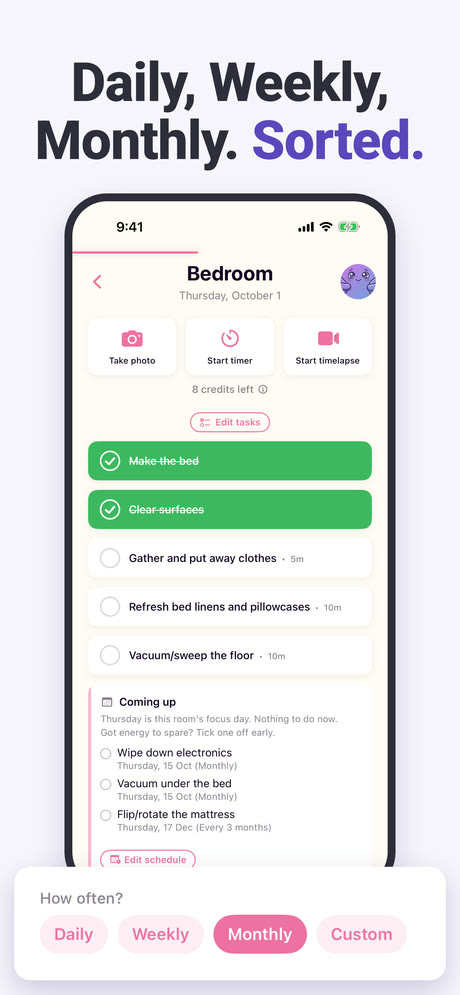
Each task is set to Daily, Weekly, Monthly or Custom, and Custom means every so many days, weeks or months. That is how flipping the mattress can be "Every 3 months" while making the bed stays daily, in the same room. Rooms arrive with tasks already in them, so you are adjusting a list rather than writing one.
Inside a room, a Coming up block shows what is scheduled next and on which date. If you are in a room on a day that is not its focus day, it says so: "Nothing to do now. Got energy to spare? Tick one off early." Tick a task off early and it says "Done today. Back on" with the next date, so you can see when it will come round again.
3. The answer on your Home Screen
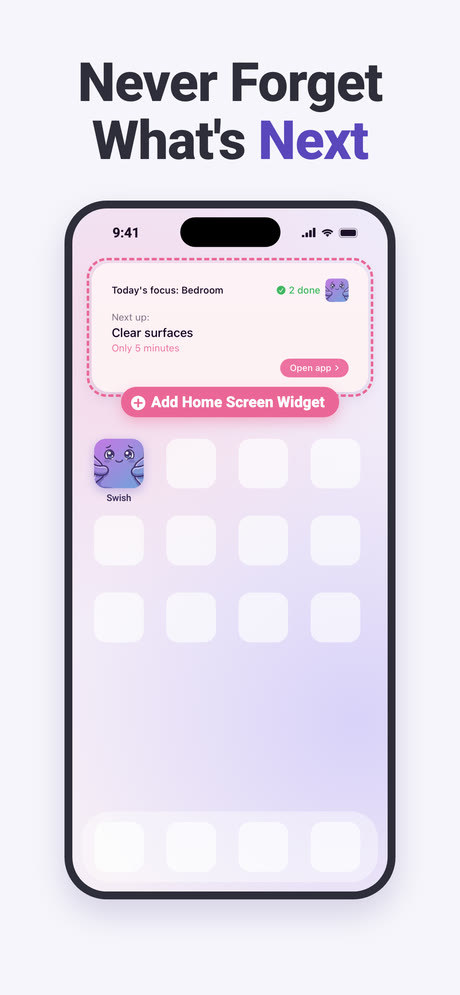
An app that tells you what to clean is only useful if you see what it says. The Home Screen widget shows "Today's focus:" with the room, "Next up:" with one task and how many minutes it should take, and how many you have done today. When the plan is finished it says so: "The rest can wait until tomorrow."
4. A reminder at the time you pick
Under Reminders you can turn on notifications and set a Reminder time, so the nudge arrives when you are actually home and able to do something. The app tells you when to clean as well as what to clean.
5. Days when today's list is too much
Some days the answer is right and still too big. You can tell the app how much energy you have, Low, Some or Full, and the plan resizes to fit. Whatever does not fit moves into a section called "If you can do more", as optional bonus. If you are going away, Vacation mode pauses your reminders until the day you are back, and the app's own promise for it is "Nothing piles up while you're gone." And if you cannot start at all, there is the "Help, I can't start!" button, which turns one photo of the mess into tiny steps, or gives you a five-minute quick win.
What it does not do
It does not look at your home. The daily answer comes from the days and frequencies you set, not from what is actually dirty, so it will not notice a spill or know that a party happened last night. You can always do something that is not on the list; the app will just not have suggested it.
It is one person's plan. There is no household, no shared list and no way to split chores with a partner, a family or flatmates. If you are looking for a cleaning schedule app that divides tasks between people, this is not it.
And it is a newer app. Today its App Store listing shows 4.8 from 104 ratings, a good average on a small number next to apps that have been around for years. If you want to see it beside the others, we have compared the main cleaning schedule apps, ours included.
Do you need an app for this?
Not necessarily. Rooms on days, a short daily list and a note of how often the big jobs come back will answer "what should I clean today" on paper too. An app is worth it when you keep losing the paper, or when the monthly and every-three-months jobs never get done because nothing tells you they are due. That is exactly the part ADHD Cleaning Planner was built to remember for you.
Frequently asked questions
What room should I clean today?
Whichever room you gave today's day of the week, plus a few small daily tasks. Deciding the order once, for example kitchen on Monday and bathroom on Tuesday, means the question has an answer before you ask it. If no room has today, do only the daily tasks.
How does an app know what to clean each day?
It combines three settings: which tasks are daily, which day each room has, and how often each bigger task comes back, such as weekly, monthly or every few months. On any given day it shows the daily tasks plus whatever falls due in that day's room.
Can ADHD Cleaning Planner remind you to clean at a set time?
Yes. You can turn on a daily reminder and choose the time it arrives. A Home Screen widget also shows today's focus room and the next task. When you go away, Vacation mode pauses the reminders until the day you are back.
Do cleaning apps really work?
They work for one specific problem: not knowing what to do next. An app can decide the order and remind you, but it cannot see your home or do the cleaning. If you already know what to do and simply have no time, an app will not change much.
Is it better to clean one room at a time?
For most people, yes. A single room has a clear ending, so you can see that it is done, while a little tidying everywhere leaves no room looking finished. Giving each room its own day of the week turns that into a plan you only have to make once.