
Short answer
A cleaning app that tells you what to do decides for you: it maps your rooms, gives each one a day, and shows only today's short list. ADHD Cleaning Planner does that from the first screen, with rooms and tasks already filled in, an energy setting that resizes the day, and help for when you cannot start.
On this page
A cleaning app that tells you what to do is one that has already made the decision. You open it, it names one room and a short list of tasks for today, and you start. That sounds like a small thing to hand over, but the deciding is the expensive part. For a lot of people, and for people with ADHD in particular, a house is not hard to clean. It is hard to choose where to begin.
What does an app have to do before it can tell you what to clean?
Three things, and most apps only manage one or two of them.
It has to know your home. A list written for a four-bedroom house with a utility room is useless in a studio flat. An app that opens empty and asks you to build the list yourself has handed the decision straight back to you, which is the job you downloaded it to avoid. The setup is where most cleaning apps are abandoned.
It has to keep today small. An app that opens on everything you are behind on is a guilt machine. The useful version shows one room, a few tasks, and nothing else, because the only question that matters is whether you can start in the next minute.
It has to survive the days you do nothing. Any app looks good on a Saturday when you have energy. The real test is a Wednesday evening when you have none, and whether what you see then is a short doable list or a pile of overdue badges telling you how far behind you are.
None of that needs software. You can write out your rooms, give each one a day of the week, and put four or five tasks under each, and you will have the whole mechanism on one sheet of paper. The free ADHD cleaning schedule builds exactly that. An app is the version that remembers it for you and puts it somewhere you will actually look.
Why the deciding is the hard part with ADHD
Standing in a messy room and not being able to begin is not laziness, and it is usually not procrastination either. It is what happens when a brain has not broken the mess into steps: the room arrives as one enormous undefined job, and there is nothing small enough to pick up first. That is ADHD task paralysis, and more willpower is not the fix. A smaller, more concrete first action is.
This is why "what should I clean today" is the question worth automating. Once it is answered, the rest of the job is ordinary work.
How ADHD Cleaning Planner works, screen by screen
ADHD Cleaning Planner is an iPhone and Android app, free to download with in-app purchases, and it needs no account. You do not sign up, and nothing waits on an email confirmation before you can use it.
1. Your home, in about a minute
Quick house setup asks how many bathrooms you have, how many bedrooms, and whether there is an office, then builds the rooms for you. Each room arrives with tasks already in it, with a rough number of minutes on each. You can rename rooms, add your own, duplicate one, or edit any task, but you can also ignore all of that and start cleaning.
2. Today's plan, and nothing else
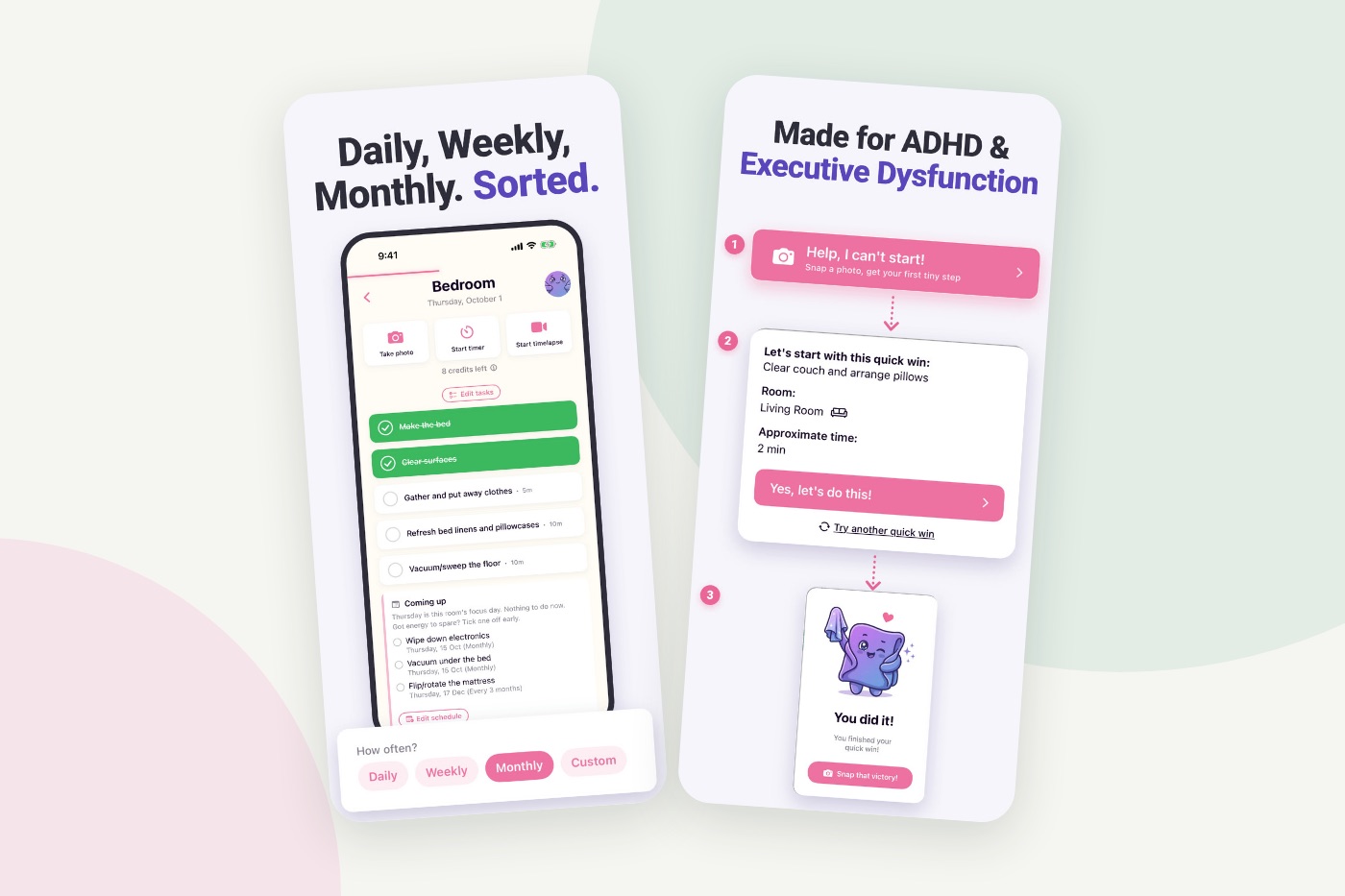
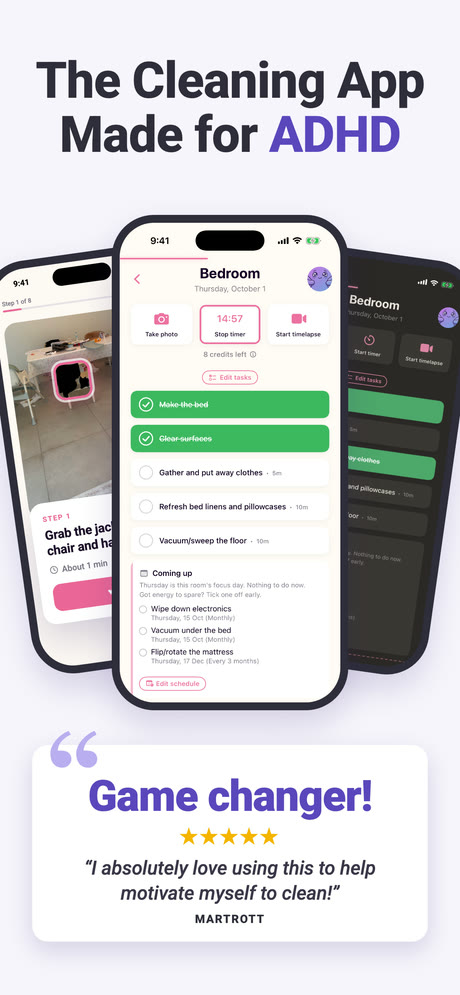
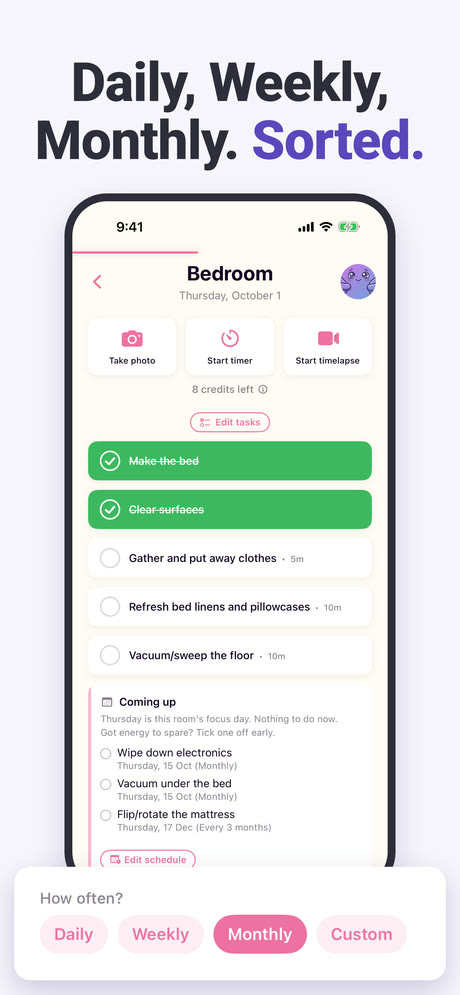
The main screen names today's focus and shows that room's tasks. Daily tasks come up every day. Everything bigger is set to Daily, Weekly, Monthly or a custom interval, and lands on the one day a week you picked for that room. A "Coming up" block shows what is scheduled next, so the week is visible without being in your way today.
3. Telling it how much you have today
Before you start you can set the day's energy to Low, Some or Full. The plan resizes to fit, and anything that does not fit moves into a bonus section below rather than vanishing or turning into a miss. On a low day the honest version of the plan is two tasks, and the app will show you two tasks.
There is no overdue list. What you skipped does not come back the next morning in red, because the next morning opens on the next day's plan, which is the same principle behind a cleaning routine with a floor under it.
4. When you cannot start at all
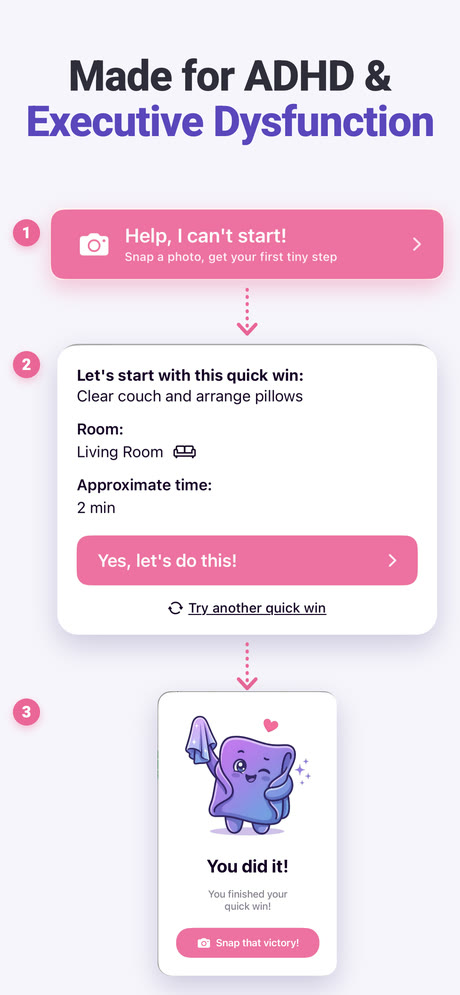
There is a button on the main screen called "Help, I can't start!", and it does two different things depending on what you can manage.
Take a photo of the mess and the app turns that photo into a few tiny steps, one at a time, starting with the smallest. The photo is read by AI, which the app tells you before the first one is sent, and there is a limit on how many photos you can send per day. If pointing a camera at the room is already too much, there is a second route: a five-minute quick win, one specific task in one named room, with a "Yes, let's do this!" button and nothing else to decide.
5. Seeing it without opening the app
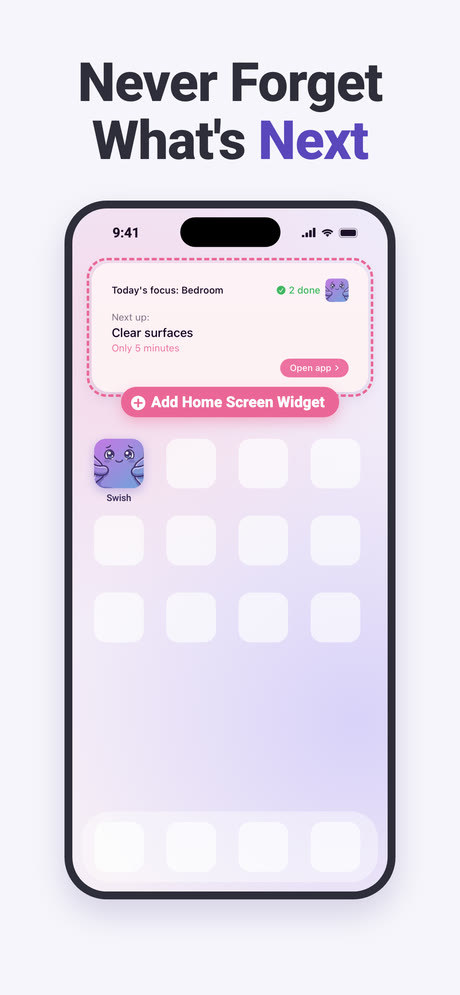
An app you have to remember to open is one more thing to remember. The Home Screen widget puts today's focus and the next task where you already look, with the minutes it should take and how many you have done.
6. Proof that you did it
While you clean you can run a timer, record a timelapse, or take before and after photos. These land in a gallery called "My Wins". That is not decoration: an ADHD brain is good at remembering an hour as one in which nothing happened, and a timelapse is harder to argue with than a memory. Completing tasks also unlocks furniture for a room you decorate, and there are ten levels to climb.
What does it cost?
The app is free to download, and there is a free plan you can stay on. Premium comes three ways: a monthly subscription, a yearly one that opens with a free trial you can cancel before it ends, and a single lifetime payment for people who would rather not have a recurring charge at all. Prices differ by country and change over time, so the store listing is the only sensible place to read them.
One thing worth knowing before you install: timelapses, before and after photos and the photo steps run on credits, and you start with a handful of free ones. That is the "8 credits left" line at the top of the room screen in the pictures above. What else premium adds is listed on the store page, which is the version that stays current.
What it does not do
It is a single-person app. There is no household, no shared plan, no way for a partner or a flatmate to see your list or take a task off it. Your plan lives on your device and syncs to your other devices through iCloud if you want it to, and you can export it to a backup file and import it again, but it does not travel to somebody else. If what you need is chores split between two people, look elsewhere.
It is also a newer app than most of what it sits next to in the store. At the time of writing its App Store listing shows 4.8 from 98 ratings, which is a good average on a small number. Apps that have been around for a decade have thousands. That is worth knowing before you read any ranking, ours included: we have compared the main cleaning apps honestly, and more ratings genuinely does mean more people have found the edges.
And the photo feature has real limits. AI gets things wrong sometimes, the app says so itself, and there is a daily cap on photos. The quick win route does not depend on any of that, which is why it is there.
Is it worth installing?
If your problem is that you do not know what to clean, an app that decides for you removes the step you are stuck on, and this one removes it on the first screen rather than after an hour of setup. If your problem is something else, a shared household, a cleaning rota for three people, or simply not having the time, no app is going to fix that, and this one will not pretend to.
Frequently asked questions
Does ADHD Cleaning Planner tell you what to clean each day?
Yes. Each room gets one focus day in the week, and daily tasks happen every day. When you open the app it names today's focus and lists the tasks under it, with a rough number of minutes next to each. You are not asked to choose a room or build a plan first.
Do you have to set up all your rooms and tasks before you can start?
No. Rooms arrive with tasks already in them, and Quick house setup asks how many bathrooms and bedrooms you have and whether there is an office, then builds the rest. You can add, rename or delete rooms and edit any task afterwards, but nothing is blocking you on day one.
What happens on a day when you have no energy at all?
You set the day's energy to Low, and the plan shrinks to fit. What does not fit stays below as optional bonus rather than disappearing or counting as a miss. There is also a button that gives you one five-minute task instead of a list, which is often the only thing that moves on a day like that.
Can you share a cleaning plan with someone else in the app?
No. There is no household or shared plan: one plan belongs to one person's device, syncing between their own devices through iCloud if they want it. If you are looking for an app where a couple or a flatshare splits chores and sees each other's progress, this is not that app.