
Short answer
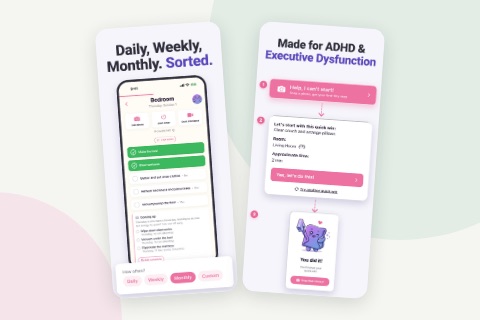
The best app for ADHD task paralysis is one that does the step you are stuck on: it picks one small, physical first action, puts a time on it, and asks for nothing else. ADHD Cleaning Planner does this for cleaning with a "Help, I can't start!" button that turns a photo of the mess into tiny steps.
On this page
The best app for ADHD task paralysis is not the one with the most features. It is the one that does the single step you are stuck on: it looks at a job that feels like one enormous thing, picks one small physical action, puts a time on it, and asks for nothing else. If an app needs you to plan, sort or choose before it helps, it has handed the hard part straight back to you.
Why most apps don't help with task paralysis
Task paralysis is wanting to start, knowing it matters, and still not being able to move. With ADHD it usually happens because the brain has not broken the job into steps, so there is nothing small enough to pick up first. We have written about what ADHD task paralysis is and why a mess makes it worse; this page is about what an app can and cannot do about it.
Most productivity apps are built to store tasks. You type "clean the kitchen", it sits on a list, and the app reminds you about it. That is useful for remembering. It does nothing for starting, because the list still says "clean the kitchen", and breaking that into a first step is exactly what you could not do in the first place. A long list of big tasks can even make it worse: each line is another undefined job, and now there are twelve of them looking at you.
The same goes for apps that open on everything you are behind on. Red badges and overdue counts add pressure, and pressure is not what is missing.
What to look for in an app for task paralysis
Whether you use our app, another one, or a piece of paper, these are the things that actually move someone who is stuck:
- One next action, not a list. The screen you see when you are stuck should show one thing to do. Everything else can wait somewhere you do not have to look.
- Small and physical. "Tidy the living room" is a project. "Pick up the jacket and hang it up" is an action. The test is whether you could do it without thinking about how.
- A time on it. "About one minute" is a promise your brain can accept. A task with no end in sight is the one you never begin.
- No setup in the moment. When you are paralysed you cannot build a plan, choose categories or fill in a form. The help has to work from the first tap.
- A smaller fallback. Some days even the small step is too much. A good tool has a version below that.
- Permission to stop. One step done should count as done, not as the start of a session you now owe.
You can do all of this without any app. Write the first step as a verb and an object ("put the mugs in the sink"), set a timer for two minutes, and allow yourself to stop when it rings. Having someone in the room, or on a call, can do part of the deciding for you; that is body doubling, and it works without a phone. What an app adds is that it does the shrinking for you at the moment you cannot, which is the moment a piece of paper is no help.
How ADHD Cleaning Planner helps when you can't start
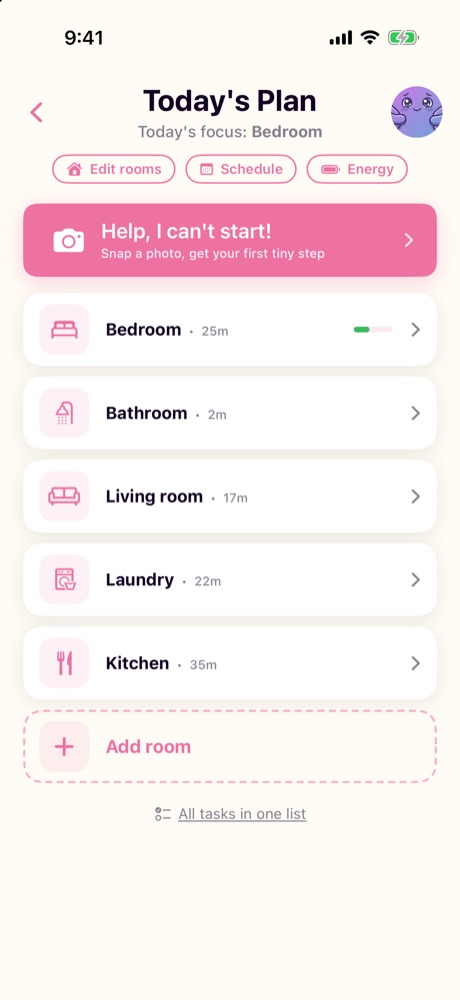
ADHD Cleaning Planner is a cleaning app for iPhone and Android, free to download with in-app purchases, and it needs no account. Its everyday job is deciding what to clean and when. For the moments when even today's short list is too much, Today's Plan, the screen that lists your rooms for the day, has a button at the top called "Help, I can't start!", with the line "Snap a photo, get your first tiny step" under it. The screenshots below are from the iPhone version.
1. Take one photo of the mess
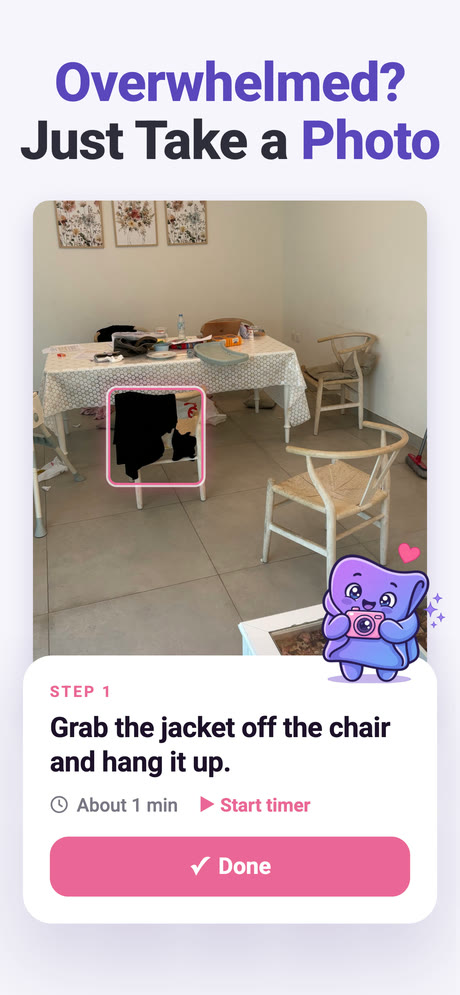
Point the camera at the room as it is. The photo is read by AI to work out what is out of place, and the app turns that into a handful of tiny steps and picks the first one for you. You see only that step: "Start with just this one." In the example below it is a jacket on a chair, marked in the photo, with "About 1 min" next to it.
2. One step at a time, with a timer if you want it
Each step has a rough number of minutes, a "Start timer" link and a "Done" button. Tap Done and the next step appears, then the next, until the last one says "Last one! You've got this!" If the steps do not match what is in your room, there is a "Doesn't match your room? Try again" link, and you can flag a step that is wrong.
When the steps are finished you can take an after photo, take a new photo of what is left to get the next round of tiny steps, or finish without a photo. None of those is required.
3. No photo? A five-minute quick win
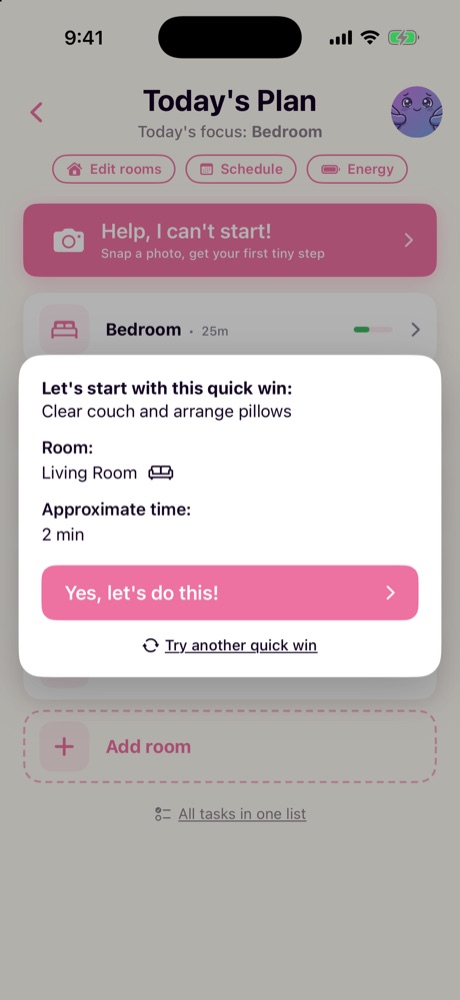
Pointing a camera at the mess is sometimes already too much. Under the camera there is a second route: "No photo? Give me a 5-minute Quick Win". It suggests one specific task in one named room, with an approximate time and a "Yes, let's do this!" button. If that task does not suit you, "Try another quick win" offers a different one. When it is done, you can keep going in that room or tap "I'm done for now", and the quick win still counts.
4. After the first step
The help button is for getting moving, not for running your whole house. Once you are going, the rest of the app takes over: rooms already filled with tasks, a schedule that gives each room a day, and an energy setting for low days that shrinks the plan instead of piling up what you missed.
What it does not do
It is only for cleaning and tidying. If your task paralysis is about emails, forms or work projects, this app will not help with those, and it does not pretend to be a general task manager.
The photo steps have real limits. They need camera access and a connection, the AI can get things wrong (the app says so itself, before the first photo is sent), and there is a daily limit on photos. The photo steps also run on credits, of which you get a few free ones to start. The quick win route has none of those limits, which is why it sits on the same screen.
And it is a newer app with fewer ratings than long-established ones. Today its App Store listing shows 4.8 from 101 ratings, a good average on a small number. If you want to see it next to other options, we have compared cleaning apps for ADHD, ours included.
So which app should you use?
Use whatever tool shrinks the first step for you at the moment you are stuck, and lets you stop after it. If that is a sticky note that says "put the mugs in the sink", that is a good tool. If you want your phone to do the shrinking, especially for a room you cannot face, ADHD Cleaning Planner's "Help, I can't start!" button was made for exactly that moment.
Frequently asked questions
What should an app for ADHD task paralysis actually do?
It should choose the first action for you, make that action small and physical, and put a short time on it. It should ask for no setup at the moment you are stuck, offer a smaller fallback when even that is too much, and let you stop after one step without counting it as a failure.
Why don't ordinary to-do apps help with task paralysis?
A to-do app stores the tasks you write into it, so you still have to break the job into steps yourself. That breaking down is exactly the part task paralysis blocks. A list of big tasks like "clean the kitchen" can even make it worse, because every item is another undefined job.
How does the Help, I can't start! button in ADHD Cleaning Planner work?
You take one photo of the mess, and the photo is read by AI to make a few tiny steps, one at a time, each with a rough number of minutes and a timer. If you would rather not take a photo, the same screen offers a five-minute quick win: one task in one room.
Can an app fix ADHD task paralysis?
No app removes it. What an app can do is take over one specific job, choosing and shrinking the first step, so that starting needs less from you. ADHD Cleaning Planner only does this for cleaning and tidying; it will not help you start an email or a work project.